Great — add this to your list of growing Instagram problems [1]. Now, instead of taking forever to choose a filter, you'll have to spend even more time perfecting those photos thanks to new editing features in Instagram 6.0. Released today [2], the app promises to give you more creative control over the pictures you share.
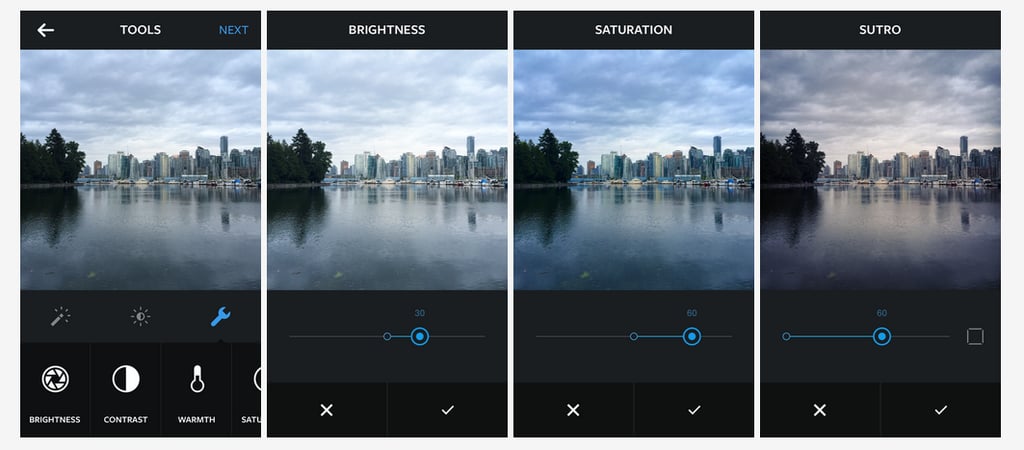
Here are the details: once you select a filter, you'll see a new wrench icon. Tap it, and you'll get a bunch of photo-editing options that include . . .
- Adjust: to crop and straighten photos.
- Brightness: to make your photo brighter or darker.
- Contrast: to make the light areas of your photo brighter and the dark areas darker.
- Warmth: to shift the colors of your photo toward warmer orange tones or cooler blue ones.
- Saturation: to increase or decrease the color intensity of the photo.
- Highlights: to adjust the brightness focusing on the bright areas of the image.
- Shadows: to adjust the brightness focusing on the dark areas of the image.
- Vignette: to darken the edges of the photo.
- Sharpen: to make the photo clearer.
- Filter Strength: to make the filter more or less obvious.
There's even a slider to adjust each of the effects even further. Plus, a photo preview feature gives you a before-and-after comparison so you can see how much of a photo-editing boss you are.
The download is available today in the App store [3] or on Google Play [4].