Create a GIF Online
Create a GIF Online Without Photoshop

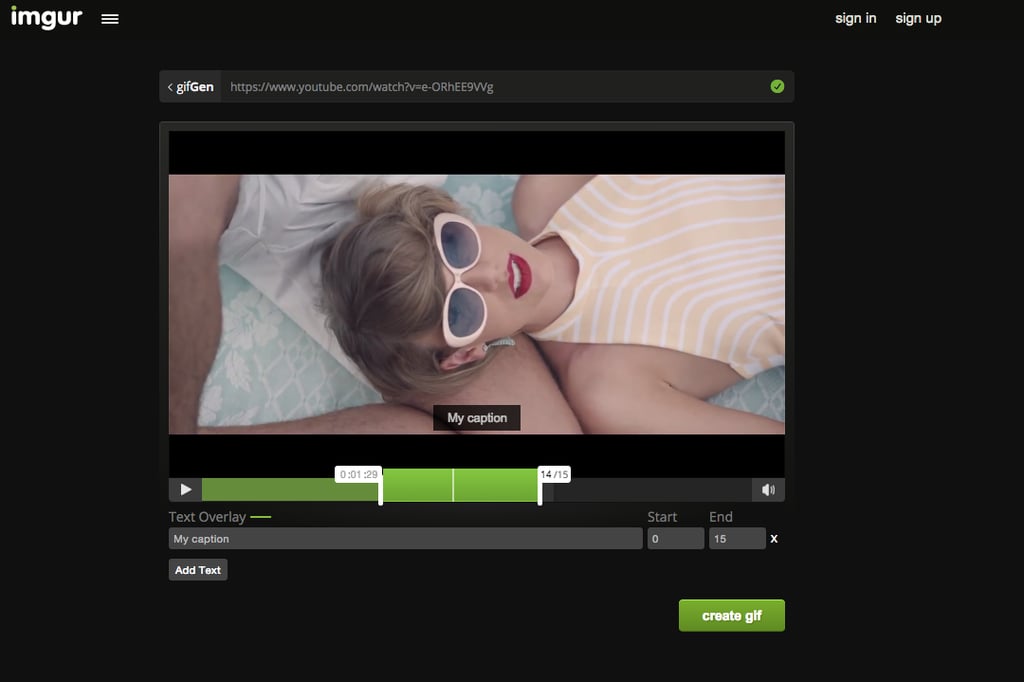
This is the hands down, fastest way to create a GIF. Ready? It's called GIFGen, and it's made by Imgur, your go-to source for hilarious photos from around the web.
It's so easy:
- Copy and paste any video link from a site like YouTube or Vimeo. For YouTube, use the shortened URL in the "Share" section.
- Paste the link into the field at imgur.com/vidgif.
- Drag the "+" slider to select a start time, then drag again to choose the duration. You can even add text if you want.
- Click "create GIF"!
The servers will then work to GIF-ize your clip. Imgur will create a webpage for your new looping, animated clip with links to the image and code to embed it into a website or blog. You don't technically get a GIF file. You get a GIFV file if the image is larger than 10 megabytes, which is better quality than a GIF but acts more like a video. One annoying thing is we couldn't get rid of the black bars in our GIF below. Sad.
Image Source: Imgur