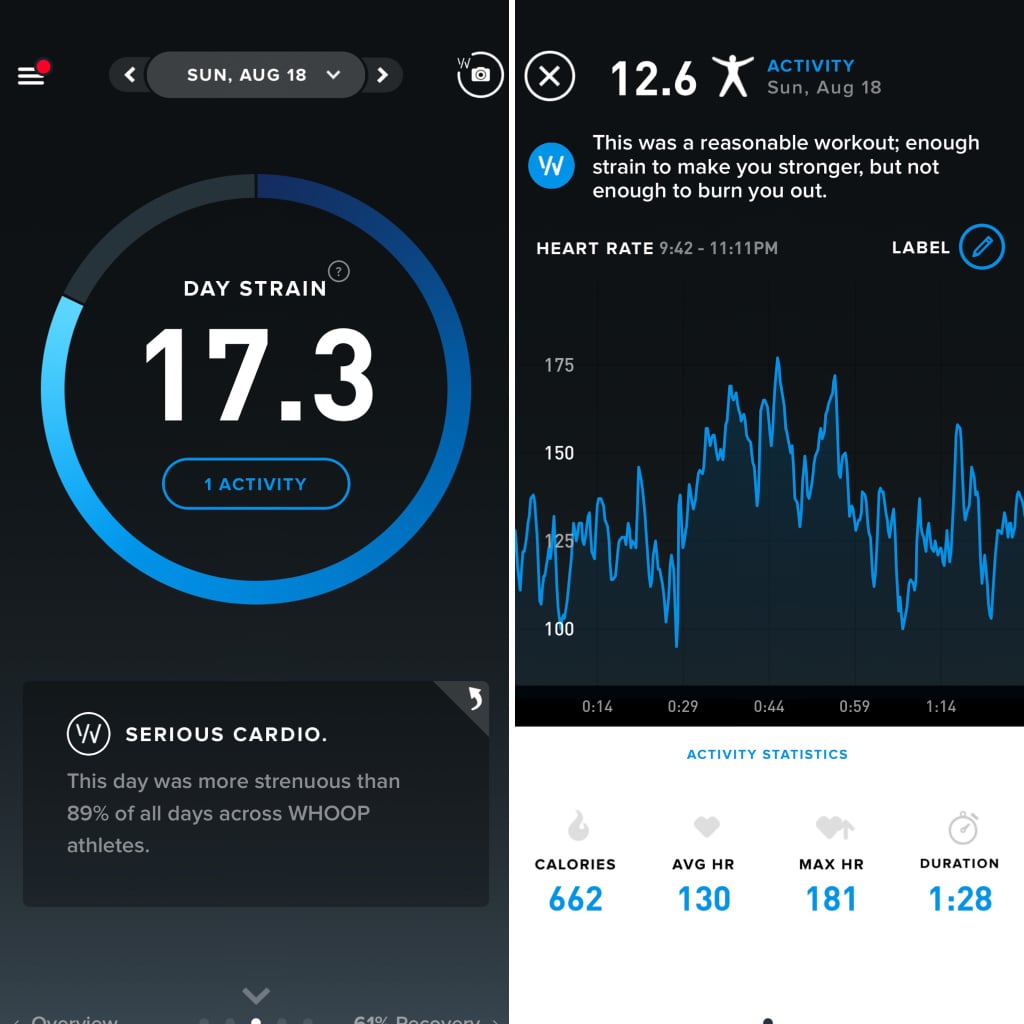
The strain tool measures the amount of strain your cardiovascular system has undergone during activity and over the course of a day. Whether you did a CrossFit workout or went on a bike ride with your friends, this is where those activities are tracked.
Your strain is measured on a scale from zero to 21. According to the app, all-out workouts (think sprinting as fast as you can) are logged as a strain of 18 and above, moderate workouts are typically 10 to 14 on the scale, and light/minimal activity are logged below a strain of 10. This scale applies to the entire day's strain as well.
Your strain isn't based on the activity, meaning a CrossFit workout isn't naturally going to be ranked higher than a yoga workout. It's based on how hard you worked. For example, you and your friend could do the same 30-minute strength workout, and have scores of 12 and 17 respectively.
The strain pillar tells you your max heart rate, average heart rate, and calories burned for individual activities and each day. You can also see how your strain statistics compare to the average strain your body underwent over the previous two weeks.
Why I like the strain tool: I like this tool because I can see how hard my body has worked on a given day. I also like seeing how certain workouts impact my body. This information helps me program my workouts more efficiently and allows me to balance out the intensities of my workouts throughout the week. It's also a nice reminder that even though you may not work out on a given day, simply moving around impacts your strain.